

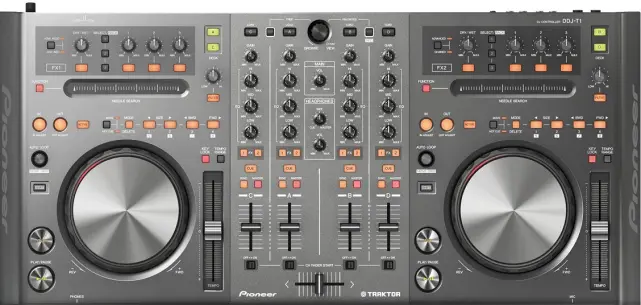
Pioneer DDJT1
DISCONTINUED
This product has been discontinued by the manufacturer. Please contact us to find a replacement.
*Discontinued
Pioneer DDJT1 (Pionee DDJ-T1)
Product Highlights
Designed Specifically for Traktor
Plug-and-Play USB Connectivity
4-Channel Deck Control
Microphone Inputs and Balanced Outputs
Advanced Pioneer Functionality
Specially Designed User Interface
The Pioneer DDJ-T1 DJ Software Controller delivers fully functional
tactile control and integration over Native Instruments Traktor DJ software. The
intuitive interface features a plug-&-play USB port, 2 wheel control decks and
an assortment of preassigned faders, knobs, buttons and switches for control
over monitoring, cuing, effects, looping, pitch and much more. The DDJ-T1 is
designed to allow a laptop keyboard to slip underneath the control surface;
exposing just the monitor and saving precious space. Microphone inputs and
balanced outputs are featured, and Pioneers P-LOCK Fader Cap is designed to
prevent fader caps from slipping.
Plug-&-Play USB Connectivity with 4-Channel Control
All buttons and knobs have been pre-assigned, so users can quickly connect the
controller to their laptop with the use of a USB cable, enabling them to start
their performances without having to adjust any complicated settings.
Additionally, the DDJ-T1 can be powered through the laptop's USB port.
Included TRAKTOR DJ Software
Includes Traktor Pioneer DDJ-T1 Edition DJ software. This popular software is
loaded with original functionality, including four-channel deck control and a
channel fader start function, which makes it easier for DJs to create exact cue
starts. (All DDJ-T1 users who have software versions earlier than v2.0 will have
free upgrade to Traktor Pioneer DDJ-T1 edition v2.0. Traktor Pioneer DDJ-T1
edition V2.0 available date and upgrade instruction will be updated on this
website when disclosed.)
Specially Designed User Interface
The controller layout and Traktor software interface are identical, ensuring
ease-of-use and precise control. The DDJ-T1 is modeled after the proven design
of the professional Pioneer DJ player and mixer and integrates 115mm jog dials,
accurate search functionality to quickly find playback points, a load button for
song data and a master synch button for beat matching across four channels.
Specially Designed User Interface
The controller layout and Traktor software interface are identical, ensuring
ease-of-use and precise control. The DDJ-T1 is modeled after the proven design
of the professional Pioneer DJ player and mixer and integrates 115mm jog dials,
accurate search functionality to quickly find playback points, a load button for
song data and a master synch button for beat matching across four channels.
Highest-Quality Sound
The controller is optimized for the Traktor DJ software and incorporates
technology from Pioneer's professional line of DJ equipment to ensure the
highest quality sound output that DJs have come to expect from Pioneer products.
Additional Features
Proprietary lock mechanism called the P-LOCK Fader Cap designed to prevent fader
caps from slipping.
Premiere built-in sound card
SPECS:
Software TRAKTOR PIONEER DDJ-T1 EDITION
System Requirements Mac OS X (10.5, 10.6 or later)
Windows 7 Home Premium/Professional/Ultimate
Windows Vista Home Basic/Home Premium/Ultimate/Business Windows (SP1 and later)
XP Home Edition/Professional (SP3 and later)
(Note: Is not compatible with Windows XP Professional x64 edition)
Inputs MIC x 1 (1/4 inch PHONE)
AUX x 1 (RCA)
Outputs MASTER OUT x 2 (1/4 inch PHONE x 1, RCA x 1)
HEADPHONE MONITOR OUT x 2 (front 1/4 inch PHONE, Mini Pin)
USB USB B connector x 1
Frequency Response 20Hz to 20kHz
THD 0.005% or less
Power Power 120 V AC 60 Hz, rated output 5 V DC
Dimensions (WxHxD) 26.8 x 3.7 x 12.5" (680.72 x 93.98 x 317.5mm)
Weight 10.8 lbs (4.89kg)
Exactly! More than<br /> anything, the people that are saying that it's an amateur device or that it doesn’t’<br /> fit on a dj booth or that it looks cheaply made are simply fanboys that need to<br /> stop. I have the S1 and I have to say that the built and along with the looks<br /> is not cheap at all and even if I take it to a Dj booth at a night club, it<br /> works great and it can take a hell of a beating than the S4. Sure, the lights<br /> should be brighter and as stated by Ean the sync button is an issued that I<br /> also dislike, but the device is much durable than the S4 and it has the<br /> professional durability that’s known famously by Pioneer that the S4 lacks. Sure,<br /> the S4 has a lot of bells and whistles and is a superb device, but not all of<br /> us cared about those features and some of us would like to scratch in our<br /> devices instead of dependent on effects or pressing buttons. Then again, some<br /> of us don't need 4 channels. In the end, not all of us are fans of Traktor or<br /> the S4 (I had it and personally I didn't like it), but it doesn't mean that<br /> Itch is better either. In the end, people will go for what they want and what<br /> they need and both controllers are great in giving people what they want. Some<br /> of you on the other hand need to stop being fanboys and enjoy the technology<br /> that we're being presented at this moment instead of taking sides with<br /> companies. In the end, it's just<br /> simply stupid.